
Give Every Technician Direct Access to the Right Expert
Phone calls force technicians to explain a problem the expert cannot see.
Standard video calls show the problem but do not provide the industrial guidance, AR context or structured workflow needed to resolve it efficiently.
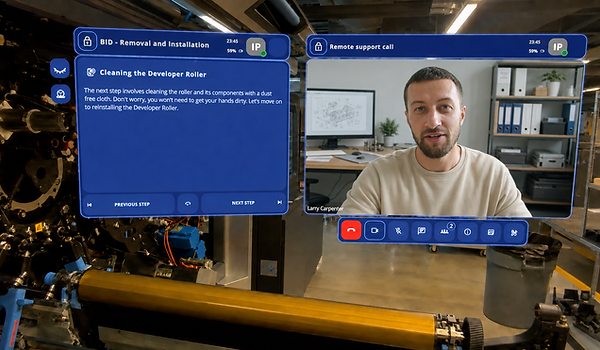
Frontline One Remote Assist brings remote visual assistance, AR guidance and guided work into the same industrial service workflow.
%20(2).png)
Step 01
See the Issue Clearly
Share live video, pause the feed and capture high-definition images so the remote expert can inspect the same equipment the technician sees.
Step 02
Guide the Work Visually
Draw, mark and highlight directly on the live view. AR annotations keep the expert’s guidance connected to the relevant machine component.
Step 03
Move from Advice to Execution
Launch Frontline One Interactive Flows and checklists during the session, helping technicians follow the correct sequence instead of relying on verbal instructions alone.
Everything Your Team Needs for Visual Remote Support
A complete set of AR and collaboration tools. Available across all supported devices from day one.
.png)
AR Annotations That Stay Anchored
Augmented Reality annotations let you draw directly on the live feed so the technician always knows exactly here to look and what to do next. Sketch freely, place beacon highlights, or drop numbered arrow markers onto the technician’s camera view. Frontline One's Remote Assist Overlays anchor and persist, so the expert does not need to re-point every time the camera moves.

In-Call Digital Twin and Guided Workflows
Share a live Digital Twin inside the session. The remote expert and technician view and interact with the same 3D Digital Twin in real time, anchored to the physical equipment in front of them. Share Interactive Flows directly from the in-call chat window to guide the technician through maintenance standard operating procedures without leaving the call.
Screen Sharing
Broadcast your desktop or a specific application window to all participants. Share schematics, diagnostic tools, or reference documents during the call
Web Client Session
Experts join directly from any browser. No app install required. Access and control a remote device from any location.
Translated Closed Captions
Real-time speech-to-text captions automatically translated into the technician’s preferred language.
In Call Chat
Send text notes, URLs, and links to files or videos during the live session without interrupting the video feed.
Connect Technicians and Experts Across Devices - Directly from the Browser
Customers, operators and experts can join supported Frontline One Remote Assist sessions through a compatible browser. The on-site technician can share the equipment view from a smartphone, tablet or supported AR headset while the remote expert joins from a computer.
No Credit Card Required

XREAL AURA

HMS SINGRAY G2

HoloLens 2

Real results. Real machines. Real industries
Trusted by industrial leaders worldwide
“The content creation for HP — which was one of the most troublesome areas for scaling XR — has now become 5 times faster than any other solution. Thousands of HP team members and clients are now receiving advanced-level support and training.”

Ayush Jain, Leader, HP xRServices
5X
Faster content deployment vs. any other XR solution
100+
Vendors evaluated by HP before choosing frontline.io
70%
Improvement in remote troubleshooting efficiency