Augmented Reality for Field Services: How It Transforms the Service Call

Augmented reality for field services overlays live equipment data, repair steps, and a remote expert's annotations onto the machine a technician is working on. It changes a service call at five distinct points: the escalation before dispatch, the walk-up to the asset, the diagnosis, the repair itself, and the sign-off.
The measured effects are encouraging. Technicians who used a head-mounted display on a working factory floor rated their understanding of the information at 6 out of 7 and their mental effort at 2 out of 7 (Coelho et al. 2024, 93). A review of industrial AR applications reports manufacturer examples in which equipment downtime fell by roughly 25 to 30 percent (Haider et al. 2025, 1131-1132).
Most write-ups treat AR as a single capability. It is easier to scope, budget, and defend internally when you look at it as five separate interventions in a workflow you already run.

What changes at each stage of a service call?
Stage | How it runs today | What AR changes | What has been reported |
1. Escalation | Specialist advises by phone, or a second visit is scheduled | Expert sees the technician's live view and annotates inside it | Low task load across every technician tested (Treinen and Kolla 2024, 542) |
2. Arrival | Technician walks between the asset and a monitoring room | Sensor readings anchored to the component they describe | Information understanding rated 6 out of 7 (Coelho et al. 2024, 93) |
3. Diagnosis | Alert history looked up on a separate screen | Alert status, severity, cause, date and trend graphs read at the fault | Frustration rated 2 out of 7 (Coelho et al. 2024, 91, 93) |
4. Repair | Paper or PDF procedure, hands occupied | Steps overlaid in sequence on the machine | Fewer errors and faster onboarding reported in automotive assembly (Haider et al. 2025, 1131) |
5. Sign-off | Visual check by eye, written up later | Automated verification against spec | 0.96 precision and 0.98 recall on the task tested (Treinen and Kolla 2024, 540) |
The rest of this article walks through those five stages, then covers device choice, technician readiness, the metrics that prove the programme worked, and what still gets in the way.

Stage 1: Can AR remote assistance resolve the call before dispatch?
Often, yes, and this is where most service organisations start, because it is the only stage that needs no content prepared in advance. A remote assist app connects the technician on site to a specialist elsewhere and lets that specialist mark up what the technician is looking at (Treinen and Kolla 2024, 539).
The technician opens a wireless session from a headset or handheld device.
The expert receives a live feed of the technician's field of view.
The expert places annotations that appear immediately in front of the technician, backed by voice.
Where the device has depth sensing, a live 3D model of the space lets those marks land precisely.
The technician works with both hands free.
In that study, every technician tested on the workflow reported a low task load, whether or not they had used the system before (Treinen and Kolla 2024, 542). Time to value is measured in weeks rather than quarters, which is usually what funds the rest of the programme. frontline.io's remote assist is built around this workflow for industrial equipment manufacturers.
Worth testing during procurement: if your technicians work on small parts and the device has no proper depth sensor, the live view degrades and annotations land in the wrong place (Treinen and Kolla 2024, 539).

Stage 2: What does the technician see when they walk up to the machine?
Today, usually nothing. Machine readings sit in a monitoring room, so technicians walk back and forth between the asset and a screen (Coelho et al. 2024, 89). Reaching the components themselves can mean ladders and heavy panels, which adds time and risk to what should be a routine check (Coelho et al. 2024, 89).
Anchoring the data to the equipment removes both trips. On a hydraulic press, each sensor was given its own panel showing three things at a glance: alert status, cycle information, and a trend graph, all visible as the technician moved around the machine (Coelho et al. 2024, 91). The eight technicians who used it rated their understanding of that information at 6 out of 7 and their physical effort at 1 (Coelho et al. 2024, 93).
Where a digital twin of the asset already exists, this stage is considerably cheaper to stand up, because the spatial model the overlay needs has largely been built.
Stage 3: How does AR troubleshooting change the diagnosis?
Diagnosis is where the technician needs history, not just the current reading. In the press deployment, the detailed panel showed the current alert state, past alerts with their severity, the cause and the date, plus a graph of recent samples with an adjustable window (Coelho et al. 2024, 91).
Two points matter for scoping.
This stage runs on data integration, not content authoring. It needs a reliable feed from the machines, which is a different project from writing procedures.
It creates demand for the next stage. Once technicians could read the fault at the machine, they asked for instructions telling them how to act on it, especially for faults needing immediate intervention (Coelho et al. 2024, 93).
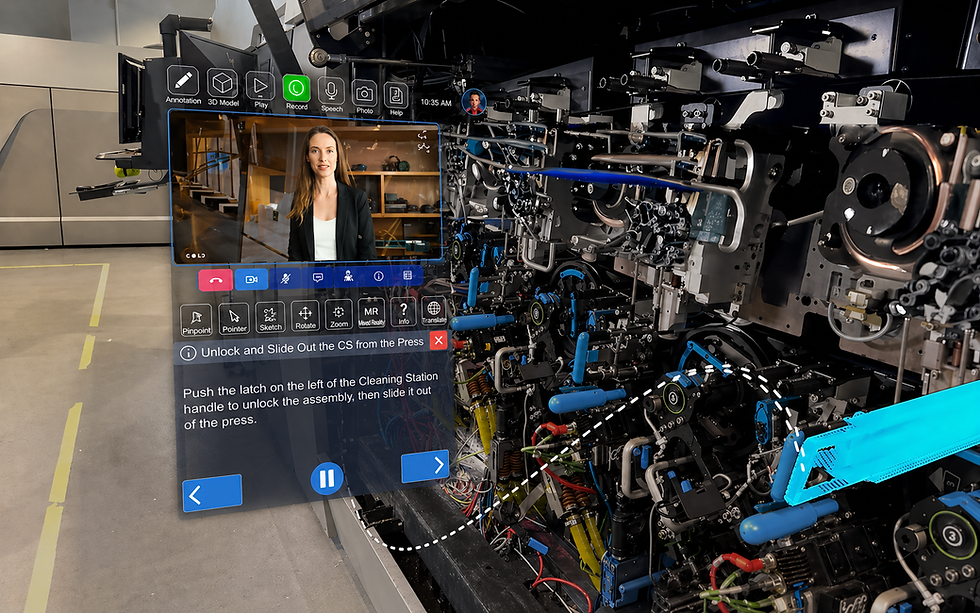
Stage 4: How do AR work instructions change the repair itself?
The repair stage is the mirror image of diagnosis in effort profile: light on integration, heavy on content.
Stage 3, troubleshooting | Stage 4, guided repair | |
Runs on | Live and historical machine data | Procedures you author in advance |
Answers | What is wrong here | What do I do next |
Setup effort | Data integration | Content creation |
How it fails | Data is stale or the connection drops | Content drifts out of date with the asset |
Time to first value | Months | Months, and it keeps requiring maintenance |
The payoff is consistency. Overlaid step-by-step guidance has been credited with lower error rates and quicker onboarding for new technicians in automotive assembly work (Haider et al. 2025, 1131).
The recurring cost is content upkeep, which is why the authoring environment matters as much as the headset. Procedures built as interactive flows are easier to revise when an asset revision changes, and that maintainability is what decides whether a library of twenty procedures is still accurate two years later.
Limit the first wave to procedures that are high volume, high consequence, or frequently done wrong.
Stage 5: Can the sign-off inspection be automated?
Partly, and this is the least mature of the five stages. Automated visual verification of a completed job reached 0.96 precision and 0.98 recall on the inspection task it was tested against (Treinen and Kolla 2024, 540).
Two constraints came with it: the processing had to run on a server rather than the device because of hardware limits, and accuracy on small components depends on depth sensing (Treinen and Kolla 2024, 540, 539).
Treat this stage as a roadmap item rather than a launch requirement.
Which device should your field service technicians carry?
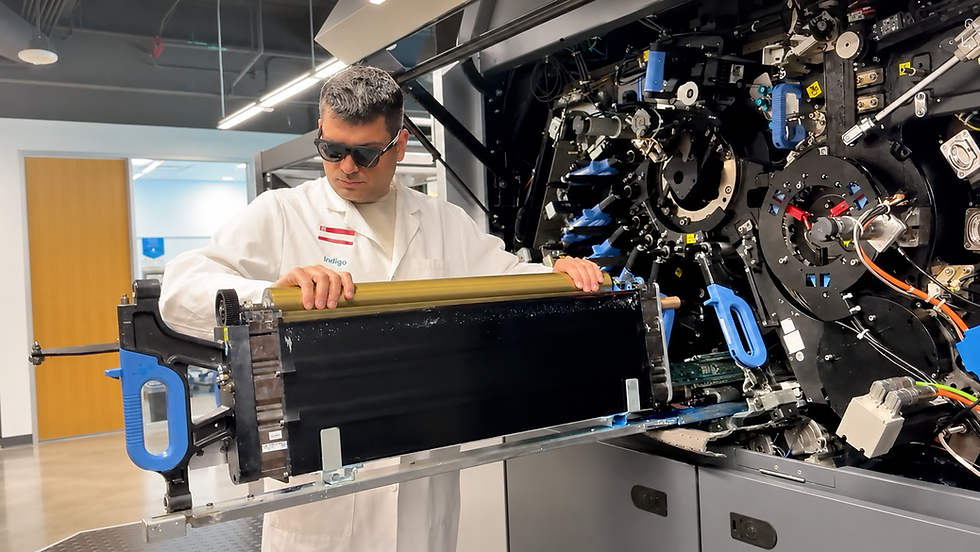
Comparing device classes against the stage is more useful than comparing spec sheets. Hands-free operation was a hard requirement in industrial inspection work for an obvious reason: the technician has to keep working while reading (Coelho et al. 2024, 90).
Headset | Phone or tablet | |
Best suited to | Stages 1 and 4, where hands stay on the equipment | Stages 2, 3 and 5, where the device can be set down |
Comfortable for long shifts | Limited by weight and battery, both raised by technicians (Coelho et al. 2024, 93) | Better |
Precision on small parts | Much better with depth sensing (Treinen and Kolla 2024, 539) | Depends on the camera |
Processing on the device | Limited, heavier work has run on a server (Treinen and Kolla 2024, 540) | Also limited |
Cost per technician | Higher | Lower, often hardware you already own |
Survives the environment | Needs checking for dust, humidity and heat | Same check applies (Haider et al. 2025, 1133) |
Two things technicians raised without being asked belong in your requirements document. They valued tracking that worked anywhere on the floor with no markers or beacons fixed to the machines, and they asked about battery life, headset weight and voice control before they asked about features (Coelho et al. 2024, 93).
In practice most service organisations end up mixed, which is why it is worth confirming early that the same content runs on phones and tablets as well as headsets, rather than being rebuilt per device.
Why does AR performance depend on technician experience?
Because the benefit scales with familiarity. On the same application, technicians new to it recorded roughly double the task load of experienced ones (Treinen and Kolla 2024, 542). In an earlier trial, everyone completed their tasks, but people with no prior AR exposure needed time to settle into the interaction first (Coelho et al. 2024, 91).
AR accelerates a competent technician. It does not manufacture competence, which is why assistance and training programmes increasingly run together rather than as separate initiatives (Morales Méndez and del Cerro Velázquez 2024, 4-5).
If you are building that side of it, immersive training covers the same content before the technician is standing in front of a live asset, and our article on immersive learning for industrial teams goes deeper on the approach.

One caveat applies to every number in this article: these are small studies, usually a handful of technicians per site, so treat the figures as a reasonable expectation rather than a promise (Treinen and Kolla 2024, 536).
How do you prove the programme paid for itself?
By tracking the same indicators before and after, which is less common than it sounds (Haider et al. 2025, 1133). Map each metric to the stage it should move.
Escalations and repeat visits, the number Stage 1 hits hardest.
Diagnosis time, separated from execution time, which is where Stages 2 and 3 show up.
Mean time to repair overall.
First-time fix rate, per asset class, not averaged across the fleet.
Rework rate on procedures covered in Stage 4.
Downtime, the number your customers actually feel (Haider et al. 2025, 1131-1132).
Time to competence for a new technician on a defined asset.
Technician workload and usability, captured with NASA-TLX and the System Usability Scale (Treinen and Kolla 2024, 536).
Collect items 1 through 6 for at least one maintenance cycle before the pilot starts. Skip that and you finish with opinions instead of a business case.
Items 5 and 7 are the ones most often left unmeasured, and both become considerably easier when procedure completion is captured automatically rather than reported by hand, which is the practical argument for pairing a rollout with usage analytics from day one.
See how much your organization could save with remote support. Use the frontline.io Remote Assist ROI Calculator to estimate the impact of reduced travel, faster response times, and less equipment downtime. Calculate your potential ROI today.
What still gets in the way?
Being straight about this tends to make an internal proposal stronger, not weaker.
There is no standard way to design adaptive instructions, so solutions get built case by case and quality varies between them (Morales Méndez and del Cerro Velázquez 2024, 14).
Small parts remain hard to track without a proper depth sensor (Treinen and Kolla 2024, 539).
Connectivity is a dependency. Heavier processing has had to run off the device, which means the asset needs a reliable connection (Treinen and Kolla 2024, 540).
Service content is sensitive. It carries proprietary designs and process detail, so encryption, access control and a compliance review belong in the plan (Haider et al. 2025, 1133).
Prevention is still ahead of us. AR is good at helping technicians spot hazards in front of them and weaker at warning them before a problem forms (Morales Méndez and del Cerro Velázquez 2024, 15).
Where frontline.io fits across the five stages
If you are mapping this to an actual deployment, the five stages line up with distinct capabilities rather than one product.
Stage | What you need | frontline.io capability |
1. Escalation | Live view, annotation, voice, no content prerequisite | |
2. Arrival | Spatial model of the asset with data anchored to components | |
3. Diagnosis | Machine data surfaced at the fault, with history | Digital twin plus your data integration |
4. Repair | Authored, maintainable step-by-step procedures | |
5. Sign-off | Completion capture and verification | Interactive flows plus analytics |
Across all five | Same content on headsets, phones and tablets | |
Before the call | Technicians trained on the asset in advance |
Teams working in industrial manufacturing typically begin at Stage 1 and add stages as the content and data foundations come together. If you would like to talk through which stage fits your service organisation first, we are happy to walk through it with your team.
Frequently asked questions
What is augmented reality for field service?
Augmented reality for field service means overlaying digital content, such as sensor readings, repair steps and a remote expert's annotations, onto the equipment a technician is working on. It runs on headsets or handheld devices and is used mainly for inspection, fault diagnosis, guided repair and remote support (Coelho et al. 2024, 90; Treinen and Kolla 2024, 539).
How does augmented reality improve field service for industrial equipment?
It brings machine data to the point of work instead of a control room, cuts trips and hazardous access, and lets a remote specialist guide the technician inside their own field of view. A review of industrial AR applications reports manufacturer examples of downtime falling by more than 30 percent, and technicians in factory studies report low mental effort while using it (Haider et al. 2025, 1132; Coelho et al. 2024, 93).
Which stage of the service call should we start with?
Escalation. A remote assist app needs no content prepared in advance, so it can run on the next difficult call, whereas guided repair requires procedures to be authored and maintained first. Diagnosis sits in between and depends on how accessible your machine data already is (Treinen and Kolla 2024, 539; Coelho et al. 2024, 91).
What is the difference between an AR remote assist app and AR work instructions?
Remote assist connects a live expert to the technician and deploys quickly. AR work instructions deliver authored procedures with no expert on the call, which scales across a larger team but requires content to be created and kept current as equipment changes (Treinen and Kolla 2024, 539; Coelho et al. 2024, 93).
Do field service technicians need headsets, or will a phone or tablet do?
Both are used, and most organisations end up with a mix. Headsets suit repair work where hands stay on the equipment, which was a hard requirement in industrial inspection work. Handhelds cost less to roll out and work well for inspection and documentation, where the technician can put the device down (Coelho et al. 2024, 90; Treinen and Kolla 2024, 536).
Does augmented reality reduce technician workload?
Measured workload is low. Technicians on a factory floor rated mental effort 2 and physical effort 1 out of 7, and everyone tested on a remote assist workflow scored in the lower range of the task load scale. Experienced users benefit more than first-time users (Coelho et al. 2024, 93; Treinen and Kolla 2024, 542).
How long before a technician is comfortable with AR?
There is a short adjustment period, mostly for technicians who have never used AR, though they still complete their tasks successfully. The difference shows up in effort rather than success: task load for experienced users came in at roughly half that of newcomers on the same job (Coelho et al. 2024, 91; Treinen and Kolla 2024, 542).
Can AR verify a repair automatically?
Up to a point, and it is the least mature part of the workflow. Automated verification reached 0.96 precision and 0.98 recall on the inspection task it was tested on, but the processing had to run on a server rather than the device, and accuracy on small components depends on depth sensing (Treinen and Kolla 2024, 540, 539).